

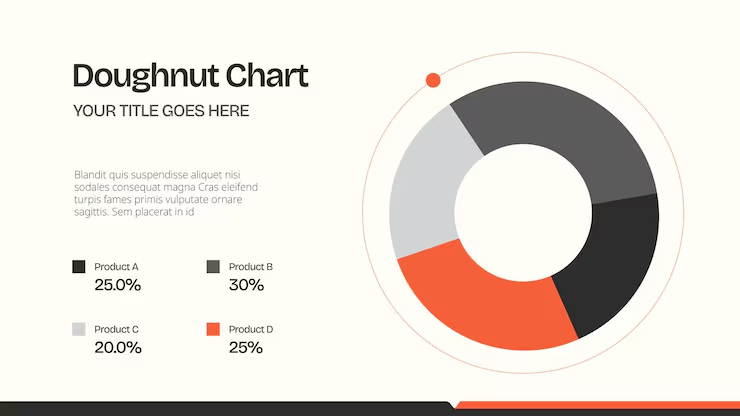
This guide is written for professionals, students, small business owners, and content creators who need to build visually polished pie and donut charts quickly and are trying to figure out which platform will give them the best results without a design background or a large budget. After reading, you will be able to evaluate the most common types of chart design platforms against a consistent set of criteria, understand the trade-offs between them, and make a confident decision about which tool fits your specific needs.
What Makes a Pie or Donut Chart Tool Worth Using
Pie and donut charts are among the most recognized data formats in business communication, but they are also among the most frequently produced poorly. Unbalanced color choices, overcrowded labels, misaligned legends, and disproportionate segment sizing are all common problems that undermine the credibility of the data being presented. The right platform does not just make the chart-building process faster. It actively prevents these problems by providing thoughtfully designed templates, guided customization, and output controls that ensure the final result looks intentional.
The challenge is that “chart tool” covers a wide spectrum of products, from highly technical data visualization platforms built for analysts to general-purpose design apps that happen to include chart elements. Each category serves a different kind of user with different needs. The criteria below give you a consistent framework for evaluating any tool you consider, regardless of where it falls on that spectrum.
Eight Criteria to Evaluate Any Chart Design Platform
Template Design Quality
The first thing to look for is whether a platform’s pie and donut chart templates are genuinely publication-ready or whether they require significant design work before they look professional. A good template should already have balanced segment colors that are visually distinct from one another, clean typography, and a layout that does not compete with the chart for visual attention. Templates that are designed for specific use cases, such as budget summaries, survey results, market share breakdowns, or fundraising progress, are more useful than generic placeholders because they give you a realistic starting point.
Check also whether templates are refreshed regularly. Outdated design trends in chart layouts can make your presentations feel dated even when the underlying data is current.
Data Entry and Real-Time Editing
How a platform handles data input is one of the most practical considerations for non-technical users. The smoothest workflow is one where you click directly into a chart element, type your values, and see the segments adjust in real time. Platforms that require a separate data import process, or that ask you to configure a spreadsheet connection before displaying any visual output, add meaningful friction for users who are working with small, manually entered datasets.
Look for tools that also let you edit segment labels, values, and percentages independently, and that give you the option to format numbers as raw values, percentages, or custom text depending on the context in which the chart will be displayed.
Color Customization Controls
Color is the primary language of a pie or donut chart. Each segment needs to be visually distinct from its neighbors, and the overall palette needs to feel coherent rather than arbitrary. Evaluate whether a platform lets you apply custom hex codes for precise brand color matching, choose from pre-built palettes, and adjust individual segment colors without disrupting the rest of the chart.
The most useful platforms also offer palette recommendations based on the number of segments in your chart, since a two-segment chart requires a very different color approach than one with five or six segments. Automatic accessibility checks, such as flagging low-contrast combinations, are a bonus feature worth noting.
Label and Legend Flexibility
Poorly placed labels are one of the fastest ways to make a chart look amateur. A strong platform gives you explicit control over where labels appear, whether inside the segment, adjacent to it, or connected by a line, as well as what the label displays, whether that is a percentage, a raw number, a category name, or a combination. The ability to toggle legends on or off and reposition them relative to the chart is also important, since the default legend placement on many tools does not work well for all chart sizes and contexts.
Donut charts in particular benefit from the ability to place a central label inside the hollow, such as a total value or a key metric. Platforms that support this without requiring a workaround are significantly more efficient for this chart type.
Export and Output Options
Where your chart will live determines what export capabilities you need. For a printed annual report, you need a high-resolution PDF or PNG at 300 DPI or higher. For a presentation, a PNG with a transparent background lets the chart sit cleanly on any slide color. For social media, platforms that export to preset pixel dimensions for specific channels save time compared to manually resizing. For embedded digital reports, SVG format preserves sharpness at any scale.
Check whether the free tier of any platform you are evaluating limits resolution or format options. Some tools offer full design functionality for free but restrict exports to lower-quality outputs unless you subscribe, which can be a significant limitation for professional work.
Integration With Surrounding Design Elements
Pie and donut charts rarely appear in isolation. They typically live inside a report page, a presentation slide, a social media graphic, or an infographic. A platform that lets you build the complete surrounding layout in the same workspace, adding headings, body text, icons, supporting images, and background treatments alongside the chart itself, is far more efficient than one that forces you to export a raw chart file and reassemble it in another application.
Evaluate how much of your overall design workflow a platform can absorb. The fewer tools you need to switch between, the less time you spend on file management and the more control you maintain over your final output.
Collaboration and Review Features
If your charts need approval before they are published, used in a client presentation, or included in a shared report, collaboration features matter. Look for platforms that offer shareable links that allow colleagues or clients to view or comment on a design without needing their own account. Version tracking, the ability to leave comments on specific design elements, and real-time co-editing are features that reduce the review cycle from days to hours for most teams.
Pricing Transparency and Free Plan Value
Many platforms in this category offer a free tier that covers basic use, with paid plans unlocking additional templates, export quality, brand features, or storage. Before deciding whether to upgrade, complete a full end-to-end project on the free plan and identify exactly what limitations you encountered. The most important questions are whether the templates you actually want to use are accessible for free, whether the free export quality is sufficient for your intended use, and whether any watermarks appear on downloaded files.
Platform Categories to Consider
Template-First Design Tools
These platforms prioritize visual quality and ease of use over data complexity. They are built for users who are starting from a template, entering a small to medium dataset manually, and producing a chart that needs to look great as part of a broader design. They typically offer the widest range of professionally designed templates, the most intuitive drag-and-drop editing, and the richest surrounding design toolkit. If your chart is going into a social media post, a presentation, an infographic, or a one-page report, this category is likely the right fit.
The limitation is scalability. These tools are not suited to dynamic dashboards, automated data feeds, or charts that need to update in real time from a live database. For static presentations of defined datasets, however, they produce better-looking results faster than any other category.
When comparing tools within this category, evaluate consistently across template quality, real-time data editing, color customization depth, export formats, and whether the surrounding design tools are sufficient for your layout needs.
Dedicated Data Visualization Platforms
These tools are built for users who need to connect charts to structured datasets, automate updates, or produce charts at scale across multiple data sources. They generally handle more chart types and larger data volumes than template-first design tools. Some offer donut and pie chart templates, though the aesthetic quality tends toward the utilitarian end of the spectrum.
The trade-off is usability. Dedicated data visualization tools typically require more configuration before you see any visual output, and they assume a higher level of comfort with data structures and chart settings. They are the right choice when accuracy and data volume are the primary concerns, but they are not the most efficient path to a polished, design-forward pie or donut chart for a general audience.
When comparing tools in this category, apply the same criteria: how easy is data entry, how much label control do you have, what are the export options, and does the output integrate well into the broader design you are building?
Presentation Software With Built-In Charting
Several widely used presentation platforms include native chart creation features that produce pie and donut charts directly within the slide editor. These tools are the most convenient option if your charts are going exclusively into slide decks and you do not need to reuse them in any other context. The workflow is tightly integrated, but the template quality and customization depth are generally more limited than what you will find in dedicated design or visualization platforms.
For occasional chart creation embedded in a presentation workflow, this category is worth considering for its convenience. For users who produce charts regularly or need them for contexts beyond slides, a more capable dedicated tool will be a better long-term investment.
Adobe Express: A Solid Option for Design-Quality Charts
For users who need pie and donut charts that look professionally designed without requiring design expertise, the chart maker inside Adobe Express is worth a close look. The platform is free to get started, works on both desktop and mobile, and is built specifically for non-designers who need polished visual output quickly.
Three features stand out relative to other tools in the template-first category. First, the chart element in Adobe Express supports real-time data entry with live visual updates, meaning you type your values and immediately see the segment proportions adjust. You can add legends, enter numerical data, adjust opacity, and lock the chart in place while continuing to build the surrounding layout, all within the same editor.
Second, Adobe Express includes access to Adobe Stock photos, icons, fonts, and graphics directly within the editor at no additional cost on the free plan. For users building a full infographic or report page around a chart, this eliminates the need to source supporting visual assets from a separate platform and reassemble everything manually.
Third, the brand kit feature on paid plans allows teams and businesses to save their exact brand colors, logo, and font selections and apply them to any chart template in a single click. For organizations producing charts on a recurring basis for reports, client presentations, or marketing materials, this feature alone can significantly reduce production time and ensure consistency across every deliverable.
Comparing the Three Platform Types Side by Side
To make a direct comparison, here is how the three categories stack up across the key criteria:
- Template quality: Template-first tools lead, followed by presentation tools, then data visualization platforms.
- Data entry ease: Template-first tools and presentation tools are roughly comparable and easier than data visualization platforms.
- Color customization: Template-first tools offer the most depth. Data visualization platforms are functional but less design-focused. Presentation tools are the most limited.
- Label and legend control: Varies widely within each category. Test any specific tool directly before committing.
- Export quality: Template-first and data visualization tools generally offer the most flexible output options. Presentation tools export well for slide contexts but less so for other formats.
- Surrounding design integration: Template-first tools are strongest here by design. The other two categories require external tools for complex layouts.
- Collaboration: Available across all three categories, but depth varies by platform and plan tier.
- Free plan value: Also varies. Test the free tier of any specific tool before upgrading.
Frequently Asked Questions
How many data segments should a pie or donut chart have?
Most data visualization practitioners recommend keeping pie and donut charts to five segments or fewer. Beyond that threshold, segments become too thin to read clearly, color differentiation becomes difficult, and legends grow cluttered. If your dataset has more than five meaningful categories, consider combining the smallest values into an “Other” or “Remaining” segment and noting the grouped items in an accompanying caption or footnote. Some platforms allow you to group segments directly within the chart editor, which simplifies this process. The goal is not to omit data but to present it in a format that your audience can absorb at a glance. A chart that requires thirty seconds of study to interpret is not communicating efficiently, regardless of how accurately it represents the underlying numbers.
What is the best file format for exporting a chart for use in a presentation?
PNG with a transparent background is generally the most versatile export format for charts that will be placed into presentation slides. A transparent background allows the chart to sit cleanly on any slide color or design without a white box around it, which is a common problem when exporting charts as JPEG files. For printed documents or high-resolution deliverables, PDF preserves vector quality and scales without degradation, making it the preferred format for anything going to a professional printer or into a formal report. If you are embedding a chart in a web page or an online document, SVG format offers perfect sharpness at any zoom level. Most template-first design platforms support PNG export on free plans, with PDF and SVG typically reserved for paid tiers.
Can I prepare my data in a spreadsheet before building a chart on these platforms?
Yes, and doing so is often a good practice. Organizing your data in a clean spreadsheet before moving to a design tool helps you catch errors, confirm that your numbers add up to the correct total, and decide in advance how you want to group or label your segments. Some design platforms support direct CSV import, which can save time when working with datasets of more than a handful of values. For users who need a structured way to manage the underlying data that feeds into recurring chart reports, a database tool like Airtable is well suited to organizing and maintaining clean datasets that can then be referenced or manually entered into a design platform when producing visual outputs.
How do I make a pie or donut chart accessible to people with color vision deficiencies?
The most important step is to never rely on color alone to distinguish chart segments. Always include direct text labels on or immediately adjacent to each segment, in addition to any color-coded legend. This ensures that someone who cannot distinguish between red and green, the most common form of color blindness, can still read the chart accurately. When choosing your color palette, avoid combinations that are known to be problematic, such as red and green used as adjacent segments. High-contrast pairings that remain distinguishable in grayscale are the safest choice for general audiences. Some design platforms include accessibility-focused color palettes or contrast-checking tools. If yours does not, test your final color choices by converting a screenshot to grayscale before publishing to confirm that every segment remains identifiable.
Is it worth paying for a premium plan on a chart design tool?
The answer depends primarily on how often you produce charts and what you are producing them for. For a one-time class project or a single internal report, the free tier of most template-first platforms is sufficient. For professional or recurring use, a paid plan typically unlocks higher-resolution exports, removes watermarks, enables brand kit features, increases cloud storage, and provides access to a broader template library. The brand kit feature in particular tends to justify the cost for anyone producing charts regularly for a business, since the time saved by applying saved brand colors and fonts across every new project adds up quickly. Calculate roughly how many charts you produce per month and what your time is worth per hour, then compare that against the monthly subscription cost to determine whether the upgrade makes financial sense for your workflow.
Conclusion
Choosing the right platform for pie and donut chart creation comes down to three questions: how complex is your data, where will the chart live, and how much surrounding design work needs to happen alongside it. Template-first design tools are the strongest fit for most non-technical users who need design-quality results quickly and want to build charts as part of a broader visual layout. Dedicated data visualization tools are better suited to larger datasets, dynamic data, or technical audiences. Presentation-native chart tools are the most convenient when slides are your only output context.
Evaluate any tool you are considering against the eight criteria in this guide, test the free tier thoroughly before committing to a subscription, and pay particular attention to label controls and export quality, two areas where platforms vary more than their marketing suggests. The best chart design tool is the one that fits naturally into how you already work and consistently produces results you are confident sharing.