

WhatsApp is one of the most used communication platforms all over the world. Through its easy interface, people can easily share messages and media files. Moreover, you can use WhatsApp Business to resume business activities in a comfortable ecosystem. In some cases, users may face accidental deletion of their important WhatsApp messages.
Also, there is no official way for WhatsApp data recovery. Some proficient tools can help in restoring deleted messages. Thus, read this well-described article to find out how to restore deleted WhatsApp messages without backup.
Part 1: Why Do People Want to Restore Deleted WhatsApp Messages?
Before jumping on how to see deleted WhatsApp messages, let’s shed light on the reasons for its restoration. There can be several reasons that convince people to restore their deleted WhatsApp messages. To discover some of the reasons, proceed to the following section:
- Important Information:Your WhatsApp messages may contain important business information or legal frameworks. It can also include phone numbers, addresses, and event details.
- Emotional Value:Many people share their emotions through WhatsApp messages. Such users want to regain their deleted WhatsApp messages due to emotional connections.
- Legal Evidence:WhatsApp messages may hold legal value for some people. For example, the messages or chats may include legal agreements and documentation. In this case, recovering deleted messages is necessary.
- Past Record:Some users may want to maintain a historical record of their past communications. Due to the significance of particular WhatsApp chats, people may want to restore the messages.
Part 2: Common Causes of WhatsApp Message Deletion
Message deletion can occur anytime due to particular reasons. Here are some examples of message deletion on WhatsApp:
1. Accidental Deletion
You may have accidentally uninstalled your WhatsApp account. By doing so, all the WhatsApp messages will get deleted. In some scenarios, you may have deleted the WhatsApp conversation.
2. System Updates and Glitches
Your device will glitch regularly if you have an outdated OS or WhatsApp. This will create instability and affect the performance of your phone. In the worst-case scenario, it will also delete the WhatsApp chats due to the presence of bugs.
3. App Crashes and Data Corruption
WhatsApp may crash on your phone due to irregular updates. Moreover, a virus attack may occur due to the downloading of unverified files. In such a situation, all your WhatsApp messages will be deleted.
Part 3: The Best Tool to Restore the Deleted WhatsApp Conversation Without Backup
Do you want to know the best tool for WhatsApp data recovery? Wondershare MobileTrans is a beneficial tool to restore deleted WhatsApp data within a few taps. You can also restore deleted photos, videos, and stickers with WhatsApp messages. Furthermore, you can use MobileTrans to shift your essential WhatsApp data from Android to iOS. You can also execute the WhatsApp transfer process from Android to Android and iOS to iOS.
You can also conduct phone-to-phone transfers with MobileTrans. This tool allows you to transfer images, videos, contacts, and text messages. Moreover, you can import your data from your phone to your PC in a secure way. Hence, it is a reliable software for transferring and recovering data.
Key Points of Wondershare MobileTrans
- This tool allows you to transfer WhatsApp Business messages and other important files from one device to another.
- This tool transfersViber, WeChat, Line, and other apps between multiple devices.
- You can also transfer iCloud data to Android devices instantly. Also, you can restore WhatsApp messages from Google Drive to iOS.
- It helps in moving music playlists from one streaming service to another.
Simplified Instructions to Restore Deleted WhatsApp Messages Safely
In the following part, you can learn how to restore deleted WhatsApp messages. Thus, let’s go into further details:
Step 1: Connect your Android Phone
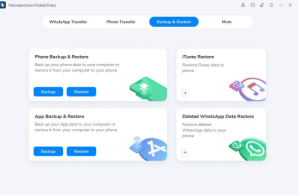
Launch Wondershare MobileTrans and attach your Android device to your PC via a USB cable. Then, select the “Backup and Restore” module and proceed to the “Deleted WhatsApp Data Restore” option.
Step 2: Change the WhatsApp Settings
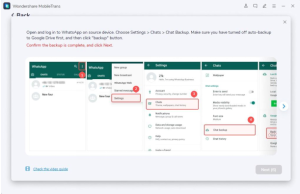
On your Android device, open WhatsApp and go to its “Settings.” Afterward, access the “Chats” settings and then the “Chats Backup” option. Turn off the auto-backup to Google Drive option and then hit the “Backup” button.
Step 3: Log Into WhatsApp Again
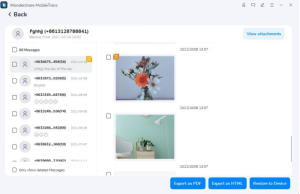
Now, reinstall WhatsApp through a USB cable carefully using MobileTrans. Ensure to give WhatsApp access to photos and media files. Afterward, enter the required details to sign in to your WhatsApp account. After entering the details, tap the “Next” button, and the tool will find the deleted WhatsApp messages. Check and select the messages you want to restore and click the “Restore” option.
Part 4: How to Get the Deleted WhatsApp Messages Back with Google Drive
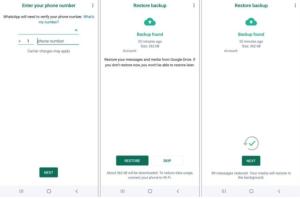
To recover deleted WhatsApp messages with Google Drive, here are the easy instructions that you can follow:
Instructions: To initiate, uninstall and reinstall WhatsApp on your Android device. Afterward, enter your phone number, and other demanded details. Now, WhatsApp will automatically bring the Google Drive backup in front of you. Tap the “Restore” button to recover all the deleted WhatsApp messages backed by Google Drive.
Part 5: Data Privacy and Security Considerations
This section will highlight some data privacy and security considerations you need to monitor while strictly recovering WhatsApp data for your convenience.
1. Understanding the Risks Involved in Data Recovery
Some recovery tools don’t erase your data from their servers. This can be a potential risk to the privacy of your data. In more severe cases, they may upload your data to unauthorized sources to blackmail you. This is why it is essential to understand the risks involved in recovering data from unidentified tools.
2. Protecting Personal Information During the Recovery Process
The most crucial factor for the safety of your data is choosing a reliable tool. The data recovery tool should have a good reputation in the market. You can check the feedback and reviews of the users of the respective tool. Moreover, the tool should prioritize the privacy of data with encrypted strategies. Hence, you should select a well-trusted tool to secure your personal information during recovery.
Conclusion
You might face permanent loss of your WhatsApp messages on accidental deletion. This might solidify in cases if you still need to create a backup for your WhatsApp data. However, with tools like MobileTrans, you can restore deleted WhatsApp messages on your phone. This article taught you how to restore WhatsApp messages without backup. Thus, you should explore MobileTrans for instant WhatsApp data recovery.